Cloud that scales with your traffic, not your bill.
Cloud engineering on AWS, Azure and Google Cloud: we migrate, automate and run the infrastructure your product depends on.
You pay for the towers, not for a peak-sized setup that idles all day.
Same architecture, whichever cloud you choose.
MoonDive delivers cloud engineering services across AWS, Azure, and Google Cloud Platform, focusing on cloud migration, DevOps, and infrastructure automation. We design scalable, secure cloud architectures, implement CI/CD pipelines, and provide continuous monitoring and incident response. The service aims to minimize downtime, optimize costs, and ensure compliance for modern businesses.
- Founded
- 2022
- Projects delivered
- 25+
- Engineers, designers and AI specialists
- 50+
We design the layers first and pick services second, so the choice of cloud follows your product, your team and your credits, not the other way round.
- Edge and CDN
- Amazon CloudFront
- Containers
- Amazon EKS
- Functions
- AWS Lambda
- Database
- Amazon RDS
- File storage
- Amazon S3
- Monitoring
- Amazon CloudWatch
From fragile to boring, in six places.
Good infrastructure is the kind nobody has to talk about. This is what changes.
Cloud migration
Before: Servers in a data center nobody wants to touch.
After: Moved to AWS, Azure or Google Cloud in steps, with a way back at each one.
- Inventory and target design
- Data replication and cutover plan
- Old setup retired cleanly
Architecture and infrastructure as code
Before: Settings clicked together in a console, by one person.
After: Every resource defined in Terraform, reviewed and versioned like the product.
- Network, compute and data design
- Terraform modules in your repository
- Separate staging and production
CI/CD and DevOps
Before: Releases done by hand, late at night.
After: Every merge tested and deployed on its own, and rolled back in one step.
- Build, test and deploy pipelines
- Preview environments for each change
- Containers that run the same everywhere
Monitoring and incident response
Before: Customers report the outage first.
After: Alerts reach the engineer on call before customers notice.
- Dashboards for health and latency
- Alerts with a clear owner
- Runbooks and incident reviews
Cost optimization
Before: A bill that grows faster than your traffic.
After: Right-sized resources, and spend you can see by service.
- Right-sizing and autoscaling
- Reserved or spot capacity where it fits
- A monthly cost review
Security and access
Before: Shared admin logins and open ports.
After: Access by role, encrypted data and a record of every change.
- Least-privilege access and single sign-on
- Encryption at rest and in transit
- Backups tested by restoring them
Move to the cloud one small step at a time.
Traffic moves over in small steps you can undo, so your users keep working while it happens.
0%of traffic on the new cloud
- Current setup
- Serving all traffic
- New cloud
- Not built yet
Every service, database and scheduled job on one list.
Teams who built with us.
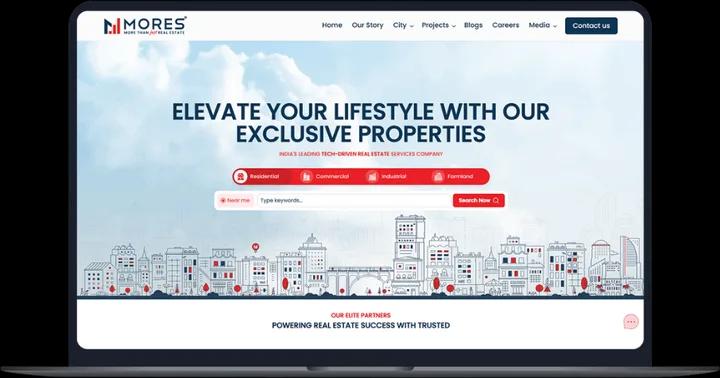
MoonDive is the name I would recommend to anyone seeking a committed custom application development company. Our relationships covered multiple areas such as software development of server-based systems with desktop and mobile apps, software testing, software consulting and integration. I really want to appreciate MoonDive team for work done in less time and effectively.
 Mohit MittalCo-founder & CEO, Moresmores.in
  Read the case study




Questions teams ask about cloud engineering.
What's the difference between AWS, Azure, and Google Cloud?
AWS, Azure, and Google Cloud are the top three cloud platforms, each excelling in different areas. AWS (Amazon Web Services) leads the market with 32% share, offering over 200 services and unmatched scalability, ideal for startups, SaaS companies, and tech-driven businesses. Azure (Microsoft) holds 23% market share and is best suited for enterprises using Microsoft tools like .NET, Windows Server, or Active Directory, making it strong in hybrid cloud environments. Google Cloud Platform (GCP), with 10% market share, specializes in data analytics, AI, and machine learning using tools like BigQuery and TensorFlow, offering competitive pricing and top-tier Kubernetes support. At MoonDive, we’re certified across all three and recommend AWS for most SaaS and startup use cases, Azure for Microsoft-based enterprises, and GCP for data-intensive or AI-driven applications.
Should I migrate to the cloud or stay on-premises?
Migrate to cloud if: You need to scale quickly (handle traffic spikes), want to reduce upfront infrastructure costs (pay-as-you-go), need global presence (deploy to multiple regions easily), have small IT team (managed services), want automatic updates and security patches. Stay on-premises if: You have strict data residency requirements (government, healthcare in some countries), have already invested heavily in data center infrastructure, need absolute maximum performance (latency-sensitive apps), or have very predictable, stable workloads (cost comparison favors owned hardware after 5+ years). 94% of enterprises use hybrid cloud (some workloads cloud, some on-prem). We help you decide what goes where.
How long does cloud migration take?
The cloud migration timeline depends on project size and complexity: • Simple Migration (10–20 servers, basic apps): 6–12 weeks • Medium Migration (50–100 servers, databases, integrations): 3–6 months • Complex Migration (enterprise, legacy systems, compliance-heavy): 8–18 months Typical Migration Phases: 1. Assessment & Planning (2–4 weeks): Identify systems, dependencies, and create a migration strategy. 2. Pilot Migration (2–4 weeks): Move 1–2 non-critical apps to test the process. 3. Phased Migration (8–40 weeks): Gradually migrate applications in batches with testing. 4. Optimization (4–8 weeks): Right-size cloud resources and implement cost management. At MoonDive, we follow the 6 Rs of migration: Rehost, Replatform, Refactor, Repurchase, Retain, and Retire, ensuring a smooth, efficient, and cost-effective transition.
How much can I save by moving to the cloud?
Cloud cost savings depend on business size and optimization level: • Small businesses (5–20 servers): Save 30–50% vs. on-prem setups (no hardware upgrades, lower IT maintenance). • Medium businesses (50–200 servers): Save 20–40% with auto-scaling, reserved instances, and spot instances. • Enterprises (1000+ servers): Save 15–30%, mainly through faster scalability and speed-to-market benefits. At MoonDive, our cloud cost optimization service cuts bill by up to 25%.
Is cloud hosting secure enough for sensitive data?
Yes, cloud hosting is secure when properly managed. Providers like AWS, Azure, and Google Cloud offer advanced protection with data encryption, DDoS defense, firewalls, IAM controls, and 24/7 monitoring. They meet key standards such as HIPAA, PCI-DSS, SOC 2, ISO 27001, and GDPR. Security works on a shared responsibility model, the provider secures infrastructure, while you manage data, access, and configurations. Since most breaches stem from misconfigurations, MoonDive ensures safety with least-privilege access, end-to-end encryption, continuous monitoring, and compliance audits. We’ve protected healthcare, fintech, and government clients with zero breaches to date.
What is cloud-native architecture and do I need it?
Cloud-native architecture means designing applications specifically for the cloud using microservices, containers (Docker, Kubernetes), serverless functions (AWS Lambda, Azure Functions), managed services, and infrastructure as code (Terraform, CloudFormation). Benefits include: • Auto-scaling: Easily handle sudden traffic spikes. • High resilience: App stays online even if one component fails. • Faster deployment: Release updates multiple times a day. • Cost efficiency: Pay only for what you use. You need cloud-native if you’re building a new SaaS product, expect unpredictable scaling, or want rapid feature delivery. You don’t need it if you’re doing a quick legacy migration, have a stable workload, or limited development capacity.
What are containers and Kubernetes, and should I use them?
Containers (like Docker) package your app and all its dependencies into a single unit, ensuring it runs the same in development, staging, and production. They enable faster deployment, better portability, and more efficient resource use compared to virtual machines. Kubernetes (K8s) is an orchestration platform that manages and scales containers automatically. It provides auto-scaling, self-healing (restarts failed containers), load balancing, and rolling updates for zero downtime. Use containers and Kubernetes if you have a microservices-based app, need independent scaling, or deploy frequently. Avoid them if your app is monolithic, your team lacks DevOps skills, or you’re just starting out (simpler options like Vercel or Heroku may suffice).
What is serverless and when should I use it?
Serverless allows you to run code without managing servers. Platforms like AWS Lambda, Azure Functions, and Google Cloud Functions execute your code automatically on demand; you only pay for the actual usage. It offers automatic scaling, no maintenance, faster deployment, and cost efficiency. It’s ideal for APIs, webhooks, data processing, scheduled tasks, and event-driven workflows. However, it’s less suitable for long-running tasks, persistent connections, or latency-sensitive apps. At MoonDive, we use serverless architecture to help businesses build scalable, high-performance backends at a fraction of the cost.
How do you handle disaster recovery and backups in the cloud?
At MoonDive, we ensure your data stay safe and recoverable through a robust cloud disaster recovery strategy. We use automated daily backups, point-in-time recovery (up to 30 days), cross-region replication, and immutable backups that protect against ransomware. Our recovery options include: • Basic (24–48 hrs. RTO): Restore from backups, cost-effective for non-critical systems. • Standard (4–8 hrs. RTO): Warm standby in another region. • Premium (<1 hr. RTO): Active-active multi-region setup for mission-critical workloads. We also define Recovery Point Objectives (RPO) to minimize data loss, from 24 hrs (daily backups) to near-zero (real-time replication). Additionally, we conduct automated backup tests, maintain detailed recovery runbooks, and perform regular failover drills.
Can you optimize my existing cloud infrastructure to reduce costs?
Yes, at MoonDive, we specialize in cloud cost optimization to help you cut unnecessary expenses without compromising performance. Most businesses waste 30–40% of their cloud spend, and our process targets those inefficiencies directly. Our optimization strategies include: • Right-sizing (up to 30% savings): Adjust or remove oversized and idle resources. • Reserved & Savings Plans (40–60% savings): Commit to predictable workloads for major discounts. • Spot Instances (60–90% savings): Use spare capacity for non-critical or testing environments. • Architecture optimization: Auto-scaling, serverless for low-traffic tasks, CDN for static files, database tuning, and smart storage tiering. On average, our clients reduce costs by up to 40%, for example, from $50K/month to $30K/month, while improving performance. We also provide monthly cost reviews to ensure your cloud stays efficient and optimized.
What is Infrastructure as Code (IaC) and why does it matter?
Infrastructure as Code (IaC) means managing and provisioning your cloud infrastructure through code files instead of manual setup in web consoles. Common tools include Terraform (multi-cloud), AWS CloudFormation (AWS-only), and Pulumi (uses languages like Python or TypeScript). Why it matters: • Version control: Track and review every infrastructure change. • Reproducibility: Create identical environments instantly. • Faster recovery: Rebuild infrastructure minutes after failure. • Collaboration: Enable team-based reviews and approvals. • Prevent drift: Keep production consistent with your code. For example, instead of manually configuring 50 servers, you can deploy them in 10 minutes using Terraform and restore everything within 15 minutes if needed. At MoonDive, we manage 100% of client infrastructure as code, ensuring speed, consistency, and reliability across every deployment.
How do you monitor and alert for cloud infrastructure issues?
At MoonDive, we ensure high uptime with a robust cloud monitoring and alerting system. We track CPU, memory, network, and costs while monitoring app performance using tools like Datadog, New Relic, and CloudWatch. Logs are centralized through ELK Stack and Splunk for anomaly and security detection. Critical alerts trigger instant PagerDuty or phone notifications, while warnings go to Slack for quick action. With 24/7 monitoring, automated fixes, and fast response, we catch 95% of issues before users notice, resolving most within 5 minutes.
What is multi-cloud vs hybrid cloud strategy?
Multi-cloud means using multiple providers like AWS, Azure, and GCP together. It helps avoid vendor lock-in, use the best services from each provider, and negotiate better pricing, but adds complexity and requires multi-platform expertise. Hybrid cloud combines on-premises infrastructure with the public cloud, allowing you to meet data regulations, leverage existing systems, and migrate gradually. However, it requires careful handling of networking, security, and management across both environments. At MoonDive, we’re cloud-agnostic and recommend: • Single cloud (80%) – Best for simplicity and cost-efficiency. • Multi-cloud (15%) – For large enterprises or specific service needs. • Hybrid (5%) – For regulated or transitional environments. We help you choose the right cloud strategy based on your goals, not provider marketing.
How do you ensure high availability and uptime in the cloud?
We ensure high availability and uptime through a robust, multi-layered cloud architecture: • Multi-AZ deployment: Apps run across 2–3 data centers in a region, ensuring 99.95% uptime even if one fails. • Multi-region setup: Deploying in multiple geographic regions (e.g., US East + West) protects against regional outages, reaching 99.99% uptime. • Load balancing: Distributes traffic and removes unhealthy servers automatically with 30-second health checks. • Auto-scaling: Adds or removes servers during traffic spikes to maintain performance. • Database resilience: Uses primary-replica setups, auto-failover, point-in-time backups, and cross-region replication for critical data.
Do you provide ongoing cloud management and DevOps support?
Yes! We offer 24/7 cloud management and DevOps support to ensure security, scalability, and performance. Our Services: • Continuous monitoring, incident response, and security updates • Monthly cost optimization and performance tuning • Backup, recovery, and compliance audits (HIPAA, SOC 2, GDPR) • CI/CD automation, Infrastructure as Code, and Kubernetes management Support Plans: • Basic: Business hours, monthly reviews • Standard: 24/7 support, 4-hour SLA • Premium: Dedicated DevOps engineer, 1-hour SLA Over 95% of clients rely on our managed services to stay focused on growth, not infrastructure.
Tell us what breaks.We will help you
Book a free call with the engineers who would do the work. We will map what to change first.